Card Preauthorization
Learn how a business can hold an amount on a card before charging a final amount once service has been delivered.
Feature Availability
This feature is only available to registered businesses in South Africa that have successfully completed the go-live process.
Introduction
Preauthorization allows you to place a hold on an amount from a customer's account before charging a final amount. This happens in two steps:
- Initialize a preauthorization transaction
- Charge the final amount
During the hold period, the money is still in the customer's account but they can’t access it. This guarantees the funds are available after service delivery. Businesses that offer payment after service delivery use this to minimize the risk of non-payment. For example, ride-hailing services, e-commerce services with payment on delivery, and online hotel booking platforms.
The default hold period is five (5) days, however, you may extend this using the expire_after_days parameter to up to ten (10) days.
You can specify the action to take on the expiry date using the expire_action parameter. This can be either capture or release.
Preauthorization flow
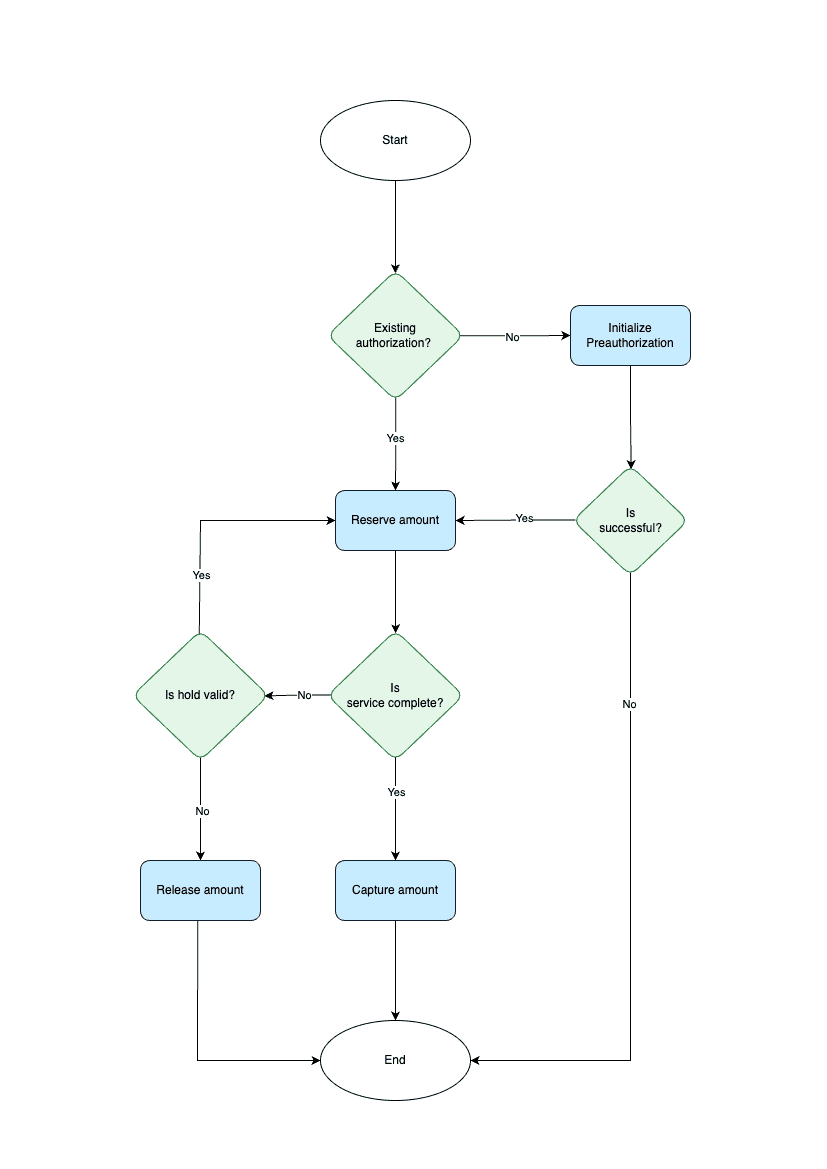
Charging an existing customer via preauthorization only takes two endpoints:
Initialize Preauthorization: This endpoint starts the preauthorization process for first-time customers. It places a hold on the amount to be charged but doesn’t process the charge yet.
Capture Preauthorization: This endpoint charges the customer the final amount. If the amount is lower than the initial preauthorized amount, the balance is automatically released to the customer.
Webhooks are essential
Webhooks are required for preauthorization as it's an asynchronous flow. Set up webhook endpoints to receive updates on status changes. Learn more about setting up webhooks.
First time preauthorization
To preauthorize a transaction, you'll use the Initialize PreauthorizationAPI endpoint. This returns a URL to the Paystack Checkout where the customer enters their card details. This is a similar flow to the Redirect, but, the funds remain in the customer's account. They won't be charged until you call the Capture PreauthorizationAPI endpoint.
To initialize a preauthorization, you need to pass the email, amount, and currency.
1curl https://api.paystack.co/preauthorization/initialize2-H "Authorization: Bearer YOUR_SECRET_KEY"3-H "Content-Type: application/json"4-d '{ "email": "customer@email.com",5 "amount": "500000",6 "currency": "ZAR"7 }'8-X POST
1{2 "status": true,3 "message": "Authorization URL created",4 "data": {5 "authorization_url": "https://checkout.paystack.com/preauthorization/NDEyOTIyOmxpdmU6ZWloZ2VodTNyczZjanJj",6 "access_code": "NDEyOTIyOmxpdmU6ZWloZ2VodTNyczZjanJj",7 "reference": "eihgehu3rs6cjrc"8 }9}
The table below shows the other optional parameters you can pass when initializing a preauthorization.
| Param | Required? | Description |
|---|---|---|
| Yes | Customer's email address | |
| amount | Yes | Amount should be in Cents, since currency is ZAR. Minimum amount is 100. |
| currency | Yes | Currency should be ZAR |
| reference | No | Unique case sensitive transaction reference. Only -,., = and alphanumeric characters allowed. If you don't pass this parameter, Paystack generates a unique reference for you |
| expire_after_days | No | The number of days until the expire_action is executed. The minimum is 1 day and maximum 30 days. Defaults to 5 days. |
| expire_action | No | Specify the action to take on the expiry date. It’s either capture or release. Defaults to release. |
| metadata | No | JSON object of custom data. Checkout our Metadata docs for more information. |
| callback_url | No | Fully qualified URL (for example https://example.com/). Use this to override the callback URL provided on the dashboard for each Transaction |
Additional Parameters
You can find all the supported optional parameters in our Accept payments table here
Once you've redirected the customer to the authorization_url and they complete the authorization, you'll receive a preauthorization.reserve.success event confirming the preauthorization.
1{2 "event": "preauthorization.reserve.success",3 "data": {4 "id": 543,5 "domain": "live",6 "status": "authorized",7 "reference": "pre_9gjnu6dc",8 "amount": 1000,9 "message": "Approved",10 "currency": "ZAR",11 "metadata": null,12 "fees": 100,13 "authorization": {14 "authorization_code": "AUTH_vbvd4qti3m",15 "bin": "455027",16 "last4": "8016",17 "exp_month": "11",18 "exp_year": "2026",19 "channel": "card",20 "card_type": "visa credit",21 "bank": "ABSA BANK LIMITED, SOUTH AFRICA",22 "country_code": "ZA",23 "brand": "visa",24 "reusable": true,25 "signature": "SIG_1zl7r116ONxGlRFXKn0C",26 "account_name": null27 },28 "customer": {29 "id": 1,30 "first_name": "John",31 "last_name": "Doe",32 "email": "john@test.com",33 "customer_code": "CUS_yqcuukj44ype5u1",34 "phone": "",35 "metadata": null,36 "risk_action": "default",37 "international_format_phone": null38 },39 "merchant_id": 1077497,40 "merchant_name": "Test Business",41 "transaction_id": null,42 "captured_at": null,43 "captured_amount": null,44 "expiry_date": "2023-11-19T23:28:52.000Z",45 "expire_action": "release"46 }47}
Complete a preauthorization
After successful service delivery, you need to complete the transaction before the hold period lapses. You do this using the Capture PreauthorizationAPI endpoint.
This endpoint requires the reference, amount, and currency to charge. The amount should be less than or equal to the initial amount.
Capture Processing
On capture, if Paystack doesn't get a definitive response, the preauthorization is put into an ongoing state and the processor is polled for a final response.
If a response is received, the preauthorization is updated asynchronously. If no response is received, it moves to capture_failed status.
1curl https://api.paystack.co/preauthorization/capture2-H "Authorization: Bearer YOUR_SECRET_KEY"3-H "Content-Type: application/json"4-d '{ "reference": "123-abc",5 "currency": "ZAR",6 "amount": "1000"7 }'8-X POST
1{2 "status": true,3 "message": "Capture attempted",4 "data": {5 "amount": 1000,6 "currency": "ZAR",7 "transaction_date": "2023-08-24T11:38:32.000Z",8 "status": "success",9 "reference": "123-abc",10 "domain": "test",11 "metadata": {12 "custom_fields": [13 {14 "display_name": "Cart Number",15 "variable_name": "cart_number",16 "value": "123443"17 }18 ]19 },20 "gateway_response": "Approved",21 "message": null,22 "channel": "preauth",23 "ip_address": null,24 "log": null,25 "fees": 373,26 "authorization": {27 "authorization_code": "AUTH_5h7ifp9x1h",28 "bin": "541541",29 "last4": "0051",30 "exp_month": "12",31 "exp_year": "2028",32 "channel": "card",33 "card_type": "mastercard",34 "bank": "Absa Bank Limited, South Africa ",35 "country_code": "ZA",36 "brand": "mastercard",37 "reusable": true,38 "signature": "SIG_6bCAS8p20rANfmuYgQ4a",39 "account_name": null40 },41 "customer": {42 "id": 180063193,43 "first_name": null,44 "last_name": null,45 "email": "customer@email.com",46 "customer_code": "CUS_zi5os4fs31qxao0",47 "phone": null,48 "metadata": null,49 "risk_action": "default",50 "international_format_phone": null51 },52 "plan": null,53 "id": 150417300254 }55}
Once a capture has been executed successfully, Paystack sends a preauthorization.capture.success event confirming the success. In case the capture fails, a preauthorization.capture.failed event is sent.
- Capture Success
- Capture Failed
1{2 "event": "preauthorization.capture.success",3 "data": {4 "amount": 1000,5 "authorization": {6 "account_name": null,7 "authorization_code": "AUTH_ove5p6reju",8 "bank": "NEDBANK",9 "bin": "492213",10 "brand": "visa",11 "card_type": "visa credit",12 "channel": "card",13 "country_code": "ZA",14 "exp_month": "03",15 "exp_year": "2025",16 "last4": "6658",17 "reusable": true,18 "signature": "SIG_9bg7BgE0xiRxNVsil7Yo"19 },20 "captured_amount": "1000",21 "captured_at": "2023-11-10T11:58:44.000Z",22 "currency": "ZAR",23 "customer": {24 "id": 1,25 "first_name": "John",26 "last_name": "Doe",27 "email": "john@test.com",28 "customer_code": "CUS_yqcuukj44ype5u1",29 "phone": "01142272921",30 "metadata": null,31 "risk_action": "default",32 "international_format_phone": null33 },34 "domain": "live",35 "fees": 0,36 "message": "Approved",37 "id": 3099,38 "merchant_id": 412922,39 "merchant_name": "Test Business",40 "metadata": null,41 "reference": "atyntuup5bec03e",42 "status": "captured",43 "transaction": {44 "currency": "ZAR",45 "transaction_date": "2023-11-10T11:58:44.000Z",46 "status": "success",47 "reference": "atyntuup5bec03e",48 "domain": "live",49 "metadata": null,50 "gateway_response": "Approved",51 "message": null,52 "channel": "preauth",53 "fees": 26,54 "id": "1504264401",55 "split": {}56 },57 "transaction_id": "1504264401",58 "expiry_date": null,59 "expire_action": "capture",60 "split_code": null,61 "split": null62 }63}
Release preauthorization
In cases where you decide not to charge the customer or they've cancelled the charge, you'll use the Release PreauthorizationAPI endpoint to release the funds. This endpoint only requires the reference passed in the request body. The funds become available to the customer within a few minutes of the request.
1curl https://api.paystack.co/preauthorization/release2-H "Authorization: Bearer YOUR_SECRET_KEY"3-H "Content-Type: application/json"4-d '{5 "reference": "123-abc"6 }'7-X POST
1{2 "status": true,3 "message": "Successfully released",4 "data": {5 "id": 507,6 "status": "released",7 "reference": "123-abc"8 }9}
Paystack sends the preauthorization.release.success event once the release is successful.
- Release Success
- Release Failed
1{2 "event": "preauthorization.release.success",3 "data": {4 "amount": 1000,5 "authorization": {6 "account_name": null,7 "authorization_code": "AUTH_ove5p6reju",8 "bank": "NEDBANK",9 "bin": "492213",10 "brand": "visa",11 "card_type": "visa credit",12 "channel": "card",13 "country_code": "ZA",14 "exp_month": "03",15 "exp_year": "2025",16 "last4": "6658",17 "reusable": true,18 "signature": "SIG_9bg7BgE0xiRxNVsil7Yo"19 },20 "captured_amount": null,21 "captured_at": null,22 "currency": "ZAR",23 "customer": {24 "id": 1,25 "first_name": "John",26 "last_name": "Doe",27 "email": "john@test.com",28 "customer_code": "CUS_yqcuukj44ype5u1",29 "phone": "01142272921",30 "metadata": null,31 "risk_action": "default",32 "international_format_phone": null33 },34 "domain": "live",35 "expired_at": "2023-11-17T12:46:58.000Z",36 "fees": 100,37 "message": "Release success",38 "id": 3101,39 "merchant_id": 412922,40 "merchant_name": "Test Business",41 "metadata": null,42 "reference": "pre_11b0qw12",43 "status": "released",44 "transaction_id": null,45 "expiry_date": "2024-11-19T23:28:52.000Z",46 "expire_action": "release"47 }48}
In the extremely rare occurrence that the release fails, you'll receive a preauthorization.release.failed event.
Should you run into this, please send an email to techsupport@paystack.com and our team will be happy to help resolve this.
Preauthorization for existing customers
About Authorizations
All active card authorizations with the reusable parameter as true can be used for Preauthorization. You should ensure the authorization_code and email are the same as used during their first transaction, else the preauthorization won’t succeed.
This is similar behavior to our Charge Authorization for Recurring Payments.
On Paystack, when a customer pays a business, we create an authorization object that’s tied to that customer. The authorization object is a tokenized version of the card.
Therefore if an existing customer has already paid via card on your Paystack business, you can skip the Initialize Preauthorization step and use the Reserve PreauthorizationAPI endpoint directly. It saves the customer from entering their card details again.
The Reserve Authorization endpoint accepts the same parameters as the Initialize Preauthorization endpoint except that it requires the authorization_code.
1curl https://api.paystack.co/preauthorization/reserve_authorization2-H "Authorization: Bearer YOUR_SECRET_KEY"3-H "Content-Type: application/json"4-d '{5 "email" : "test@paystack.com",6 "currency": "ZAR",7 "amount": 1000,8 "authorization_code": "AUTH_dalhwqi5vw",9 }'10-X POST
1{2 "status": true,3 "message": "Preauthorization successful",4 "data": {5 "id": 523,6 "domain": "test",7 "status": "authorized",8 "reference": "pre_p0xpfge2",9 "amount": 1600,10 "gateway_response": {11 "authorizeResponse": "Approved",12 "rrn": "KdeasineK"13 },14 "created_at": "2023-08-24T19:00:18.000Z",15 "released_at": null,16 "expiry_date": "2023-08-25T19:00:26.000Z",17 "currency": "ZAR",18 "metadata": null,19 "fees": 0,20 "authorization": {21 "authorization_code": "AUTH_dalhwqi5vw",22 "bin": "454545",23 "last4": "4545",24 "exp_month": "08",25 "exp_year": "2028",26 "channel": "card",27 "card_type": "visa credit",28 "bank": "NEDBANK",29 "country_code": "ZA",30 "brand": "visa",31 "reusable": true,32 "signature": "SIG_BAJR7TwTw5TwKOYCro5c",33 "account_name": null34 },35 "customer": {36 "id": 180063193,37 "first_name": null,38 "last_name": null,39 "email": "test@paystack.com",40 "customer_code": "CUS_zi5os4fs31qxao0",41 "phone": null,42 "metadata": null,43 "risk_action": "default",44 "international_format_phone": null45 },46 "merchant_id": 210002,47 "merchant_name": "ABC merchant",48 "expire_action": "release",49 "split_code": null,50 "split": null51 }52}
You can also check out our Preauthorization API referenceAPI to see more endpoints you can use for your business processes.