MCP ServerBeta
In a nutshell
The Paystack MCP Server enables AI assistants to interact with the full range of Paystack APIs using the Model Context Protocol.
Public Preview
The MCP Server is currently in public preview. If you encounter any issues or have suggestions while using it, you can create an issue to let us know about it or open a PR to add a feature.
Introduction
The Model Context Protocol (MCP) is an open standard that allows AI assistants to connect to external tools and data sources. The Paystack MCP Server uses this standard to expose the entire Paystack API to AI agents using the Paystack OpenAPI Spec.
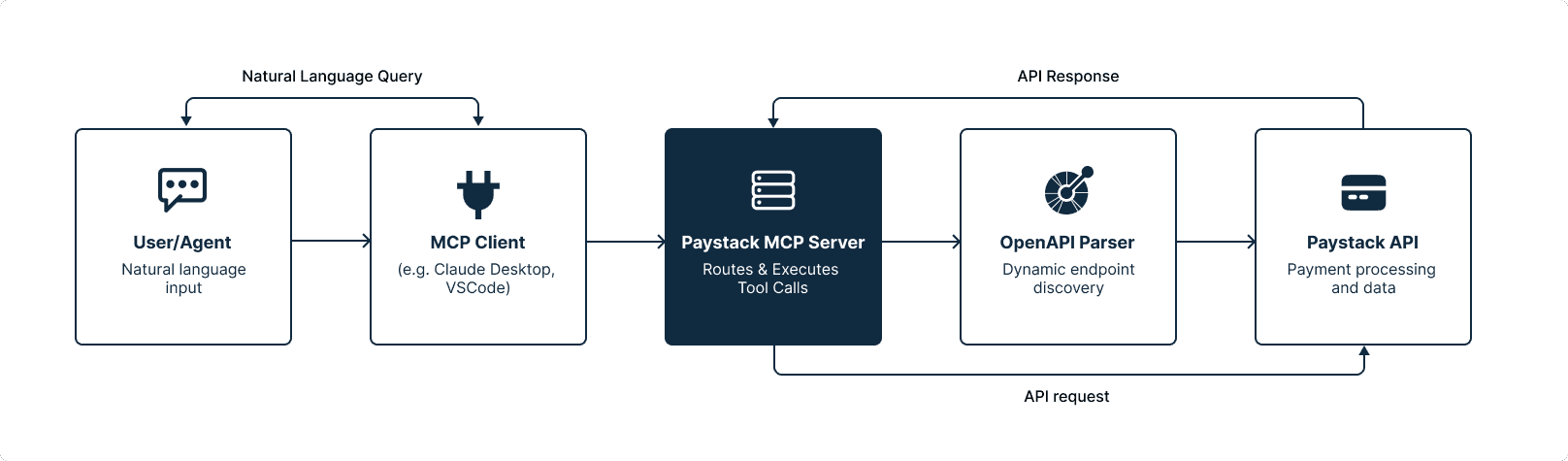
The server dynamically discovers all available API endpoints through the OpenAPI Parser and makes them accessible via a set of tools. This means that the MCP has all documented APIs ready, and you can use natural language to interact with your Paystack integration without needing to write code or refer to documentation.
Requirements
Before setting up the MCP Server, ensure you have the following:
- Node.js v18 or later
- npm or yarn
- Paystack test secret key
Getting started
Install and run the server with npx:
- Terminal
1npx @paystack/mcp-server --api-key sk_test_your_key_here2
Configuration options
You can provide your API key in two ways:
| Method | Usage |
|---|---|
| CLI argument (recommended) | --api-key sk_test_... |
| Environment variable | Set PAYSTACK_TEST_SECRET_KEY |
Security note
Only test keys (sk_test_*) are allowed. The server validates this at startup and rejects live keys to prevent unintended actions on your live integration.
How it works
The server exposes the Paystack API through the following tools and resources:
Tools
| Tool | Description |
|---|---|
get_paystack_operation | Fetch operation details (method, path, parameters) by operation ID |
make_paystack_request | Execute a Paystack API request |
Resources
| Resource | URI | Description |
|---|---|---|
paystack_operation_list | paystack://operations/list | List all available Paystack operations and their details |
paystack_skill | paystack://skill | Knowledge resource with API documentation, code snippets, and best practices. |
Example
Here's what happens behind the scenes when you ask your assistant a question like "Get me the last 5 transactions on my Paystack business".
1. The assistant browses the operations It reads the paystack_operation_list to find the operation that matches your request. The response lists every operation; the relevant resource will look like this:
1{2 "transaction_list": {3 "name": "List Transactions",4 "path": "/transaction",5 "method": "get",6 "queryParameter": [7 { "name": "perPage", "description": "Records per page" },8 { "name": "page", "description": "Page number" },9 { "name": "status", "description": "Filter by status" }10 ]11 }12 // …other operations omitted13}
2. The assistant fetches the full operation details. Once it picks transaction_list, it calls the get_paystack_operation tool to confirm the exact method, path, and parameters before making a request.
1// Tool input2{ "operation_id": "transaction_list" }34{5 "name": "List Transactions",6 "method": "get",7 "path": "/transaction",8 "queryParameter": [9 { "name": "perPage", "required": false },10 { "name": "page", "required": false },11 { "name": "status", "required": false }12 ]13}
3. The assistant executes the request. It calls the make_paystack_request tool with the operation details, appending your parameter (perPage=5) to the path as a query string. The server makes the API call to Paystack and returns the response.
1// Tool input2{3 "request": {4 "method": "GET",5 "path": "/transaction?perPage=5"6 }7}89// Actual output is truncated for brevity10{11 "status": true,12 "message": "Transactions retrieved",13 "data": [14 { "id": 4099260516, "reference": "re4lyvq3s3", "amount": 50000, "currency": "NGN", "status": "success" },15 { "id": 4099260517, "reference": "qa1b2c3d4e", "amount": 120000, "currency": "NGN", "status": "success" }16 // …3 more transactions17 ],18 "meta": { "total": 1284, "perPage": 5, "page": 1 }19}
4. The assistant replies. It uses the response from the API to generate a user friendly summary:
1Here are your last 5 transactions:21. NGN 500.00 — customer@example.com (success)32. NGN 1,200.00 — another@example.com (success)4…
Client integration
The Paystack MCP Server works with any MCP-compatible client. Add the configuration below to your client's MCP config file. Use the Local build settings if you've cloned and built the server locally.
- Hosted (npx)
- Local build
1{2 "mcpServers": {3 "paystack": {4 "command": "npx",5 "args": [6 "@paystack/mcp-server",7 "--api-key",8 "sk_test_..."9 ]10 }11 }12}
Node.js path resolution
When using command: "node", ensure you're running Node v18 or later. If you use a version manager, you might need to provide the full path to your Node binary. Run which node on macOS/Linux or where node on Windows to get the path.
Prompt recommendations
For the best results when using the MCP Server, be specific in your prompts and always include "Paystack" in your requests. The server provides built-in instructions that help the AI assistant find the right API details.
Good prompts:
- "Initialize a Paystack transaction for 50000 NGN"
- "Create a customer with email user@example.com on my Paystack account"
- "How can I send money with the Paystack API?"
- "Show me a cURL example for verifying a Paystack transaction"
Less effective prompts:
- "List my transactions" (unclear which service to use)
- "Charge a customer" (missing context about Paystack)
Clarity in your prompts
A good prompt includes: what you want to do, which Paystack feature or endpoint you need, and any specific parameters. This helps the assistant select the correct operation from the Paystack API without guessing.
Troubleshooting
| Problem | Solution |
|---|---|
| Server exits silently at startup | Check that PAYSTACK_TEST_SECRET_KEY is set or that you passed the --api-key flag |
| "Invalid key" error | The key must start with sk_test_ live keys are not allowed |
| Tools not appearing in client | Ensure the server is running and the client config path is correct |
| Request timeouts | Check network connectivity to api.paystack.co and ensure your firewall or proxy settings aren't blocking the requests |
For more information, checkout the Paystack MCP Server repository on GitHub.